
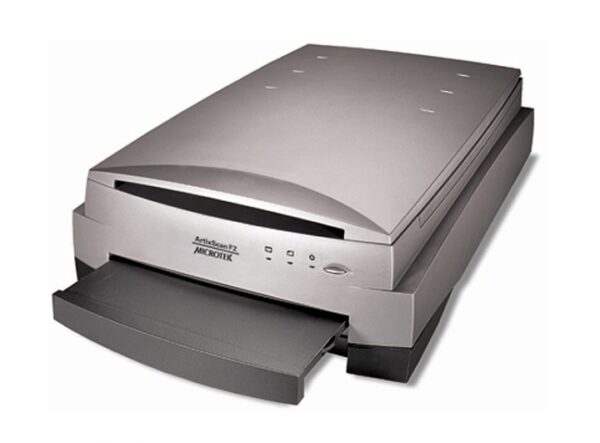
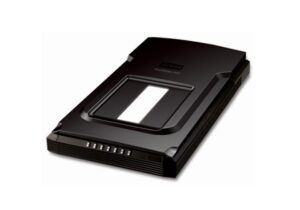
Microtek ArtixScan F2
Introduction
Enhanced from ArtixScan F1, the ArtixScan F2 captures sharp, astonishing and detailed images more faster. With 4800-dpi optical CCD and the Auto Focus technology, it enables users to focus on a specific area on scanned reflective or films and to get more sharper image.
Only Microtek provides the Emulsion Direct Imaging Technology (E.D.I.T.) for distortion-free glassless film scanning, efficiently eliminating any of problems associated with normal glass transparency scanning such as Newton rings and surface imperfection. Standard bundled with ScanWizard Pro for PC and Silverfast for Mac and PC makes this product even more fit for design, photography and printing requirement.
FEATURES
Auto Focus scan head delivers accurate scanning results
This feature allows the scanner to adjust the focus position on images through the movement of the CCD, resulting in better image quality for a chosen area of the target, which can especially be best seen when used with uneven, creased photos and film.
Twin scanbed with patented Emulsion Direct Imaging Technology (E.D.I.T.)
This is a patented “glassless” scanning system built into the lower bay of Microtek’s dual media scanners, allowing the scanner CCD to directly read the emulsion side of the film during scanning without any interfering pane of glass. This effectively eliminates problems associated with normal glass transparency scanning like Newton Rings, resulting in distortion-free images.
Built-in film scanner with Snap Trans™ holders
The ArtixScan F2 is a built-in film scanner with a separate moving light source that allows you to scan film and transparencies up to 8.5” x 10”. Included exclusive Snap Trans™ film holders accommodate 35mm slides, 35mm filmstrips, 4” x 5” film, and medium format film up to 6 x 17-cm panoramic. The 4” x 5”and medium format film holders are specially designed with spring actuated tension grips that hold the film perfectly flat, ensuring consistent scan results and yielding sharper image quality.
Standard bundled with LaserSoft Imaging’s SilverFast Ai Studio
Standard bundled with LaserSoft Imaging’s SilverFast Ai Studio 8SilverFast Ai Studio, which is regarded as the best scanner software in the world, includes the fullfunctionality. The patented and award-winning SilverFast Multi-Exposure® increases the scanner’sdynamic range, removes natural image noise and provides more details.
ScanWizardTM Pro scanning software (PC Only)
This is an advanced scanner controller program that provides many powerful, professional-level features for scanning. ScanWizard Pro features two color spaces, allowing users to work in the Native CMYK / RGB mode, as well as in the intuitive LCH (Lightness, Chroma, Hue) mode.
►Auto Dynamic Range
The system automatically determines the lightest density or tone (Dmin) and darkest tone (Dmax) of the original; then it captures the image color data with the full input tonal range of the scanner. This setting optimizes color balance and the contrast of the output image, and is most useful for scanning negative films.
►State-of-the-art ColoRescue function
With ColoRescue, the ArtixScan F2 restores faded colors in photos and film, bringing hues back to their original luster and brilliance for more vibrant images. ColoRescue’s one-click, automatic color recovery process is simple and easy to use.
►Descreen
Descreen feature can remove moire patterns when scanning pictures or photographs printed in magazines or newspapers.
►Support network scanning
Microtek’s ScanWizard pro implements a network scanning feature(Windows only) that allows this scanner to be shared among clints and server in a local area network. This utility makes it easy to share a scanner within an office.
Tailor-made Scanning Software for Mac System
ScanPotter scanning software, exclusively designed for Mac OS. More Details about ScanPotter
►OCR images into texts
The printed texts can be transferred into digital data easily and fast, saving a lot of time from entering texts manually and improving usages of images.
►Scan and Auto-crop Multiple Images
With this feature, the scanner is able to crop and extract multiple images in just one scan automatically, saving extra time from document scanning and image cropping.
►Auto-crop and auto-deskew
The auto-crop function automatically detects the size of the original image, crops the full scan frame to fit the image, and removes unwanted black borders. The auto-deskew function automatically corrects distorted images for proper alignment.
►Online Update
When detecting the latest version through the Internet, ScanPotter will automatically remind users to download the update.
Introduction
Enhanced from ArtixScan F1, the ArtixScan F2 captures sharp, astonishing and detailed images more faster. With 4800-dpi optical CCD and the Auto Focus technology, it enables users to focus on a specific area on scanned reflective or films and to get more sharper image.
Only Microtek provides the Emulsion Direct Imaging Technology (E.D.I.T.) for distortion-free glassless film scanning, efficiently eliminating any of problems associated with normal glass transparency scanning such as Newton rings and surface imperfection. Standard bundled with ScanWizard Pro for PC and Silverfast for Mac and PC makes this product even more fit for design, photography and printing requirement.
FEATURES
Auto Focus scan head delivers accurate scanning results
This feature allows the scanner to adjust the focus position on images through the movement of the CCD, resulting in better image quality for a chosen area of the target, which can especially be best seen when used with uneven, creased photos and film.
Twin scanbed with patented Emulsion Direct Imaging Technology (E.D.I.T.)
This is a patented “glassless” scanning system built into the lower bay of Microtek’s dual media scanners, allowing the scanner CCD to directly read the emulsion side of the film during scanning without any interfering pane of glass. This effectively eliminates problems associated with normal glass transparency scanning like Newton Rings, resulting in distortion-free images.
Built-in film scanner with Snap Trans™ holders
The ArtixScan F2 is a built-in film scanner with a separate moving light source that allows you to scan film and transparencies up to 8.5” x 10”. Included exclusive Snap Trans™ film holders accommodate 35mm slides, 35mm filmstrips, 4” x 5” film, and medium format film up to 6 x 17-cm panoramic. The 4” x 5”and medium format film holders are specially designed with spring actuated tension grips that hold the film perfectly flat, ensuring consistent scan results and yielding sharper image quality.
Standard bundled with LaserSoft Imaging’s SilverFast Ai Studio
Standard bundled with LaserSoft Imaging’s SilverFast Ai Studio 8SilverFast Ai Studio, which is regarded as the best scanner software in the world, includes the fullfunctionality. The patented and award-winning SilverFast Multi-Exposure® increases the scanner’sdynamic range, removes natural image noise and provides more details.
ScanWizardTM Pro scanning software (PC Only)
This is an advanced scanner controller program that provides many powerful, professional-level features for scanning. ScanWizard Pro features two color spaces, allowing users to work in the Native CMYK / RGB mode, as well as in the intuitive LCH (Lightness, Chroma, Hue) mode.
►Auto Dynamic Range
The system automatically determines the lightest density or tone (Dmin) and darkest tone (Dmax) of the original; then it captures the image color data with the full input tonal range of the scanner. This setting optimizes color balance and the contrast of the output image, and is most useful for scanning negative films.
►State-of-the-art ColoRescue function
With ColoRescue, the ArtixScan F2 restores faded colors in photos and film, bringing hues back to their original luster and brilliance for more vibrant images. ColoRescue’s one-click, automatic color recovery process is simple and easy to use.
►Descreen
Descreen feature can remove moire patterns when scanning pictures or photographs printed in magazines or newspapers.
►Support network scanning
Microtek’s ScanWizard pro implements a network scanning feature(Windows only) that allows this scanner to be shared among clints and server in a local area network. This utility makes it easy to share a scanner within an office.
Tailor-made Scanning Software for Mac System
ScanPotter scanning software, exclusively designed for Mac OS. More Details about ScanPotter
►OCR images into texts
The printed texts can be transferred into digital data easily and fast, saving a lot of time from entering texts manually and improving usages of images.
►Scan and Auto-crop Multiple Images
With this feature, the scanner is able to crop and extract multiple images in just one scan automatically, saving extra time from document scanning and image cropping.
►Auto-crop and auto-deskew
The auto-crop function automatically detects the size of the original image, crops the full scan frame to fit the image, and removes unwanted black borders. The auto-deskew function automatically corrects distorted images for proper alignment.
►Online Update
When detecting the latest version through the Internet, ScanPotter will automatically remind users to download the update.
SPECIFICATIONS
Product Name; ArtixScan F2
Scanner Type; Desktop color flatbed scanner
Model Type; MRS-4800F2
Image Sensor Type; CCD
Resolution; 4800 x 9600 dpi
Light Source; LED
Scanning Area:
Reflective: 8.5″x 14″ (216 x 356mm)
Transparent: 8″ x 10″(203 x254 mm)
Dynamic Range: Transparency ≧ 0.15 ~ 4.2 D
Bit Depth; 48 bit
Paper Size; Legal Size
Connectivity; Hi-Speed USB (USB 2.0)
Drivers; TWAIN
Supported File Types; TIF, BMP, EPS, JPG, PSD, PDF, SCT
Supported Film Types; 8”x10”, 4″ x 5″ film, 6 x 22 cm film, 135 mm film strip, 35 mm slide framed
OS Support;
Windows 7/8/10/11 (ScanWizard Pro);
OS X 10.10 – macOS 10.14 (ScanPotter);
macOS 10.15 or later (ScanPotter 2)
Dimensions (L x W x H); 22.3″ x 15.1″ x 6.3″/ 567 x 385 x 158 mm
Weight; 26.4 lbs (12 kg)
Certifications; CE, FCC, BSMI, CB, CCC
Power Source; AC 100V ~ 240 V
System Requirements for PC;
AC 100V ~ 240 V
21 System Requirements PC CD-ROM drive (for installing software)
Color display with 24-bit color output capability
512 MB RAM or more
Pentium IV PC or higher with USB 2.0 port
Microsoft Windows 7/8/10/11
System Requirements for Mac;
MacBook introduced in 2009 or later, plus MacBook (13-inch, Aluminum, Late 2008)
MacBook Air introduced in late 2008 or later
MacBook Pro introduced in mid 2007 or later
Mac mini introduced in early 2009 or later
iMac introduced in mid 2007 or later
Mac Pro introduced in early 2008 or later
Software Included;
Microtek ScanWizard Pro
Microtek ScanPotter (Mac)
SilverFast Ai Studio
Accessories;
ArtixScan F2 scanner
Hi-Speed USB cable
Power adaptor
Power cord
Vinyl Strips
Software CDs/DVDs
Film Holders
(4″ x 5″ film, 6 x 22 cm film, 135 mm film strip, 35 mm slide framed), Glass Holder Assembly, Main Holder Assembly
Reviews
There are no reviews yet.