
Introduction
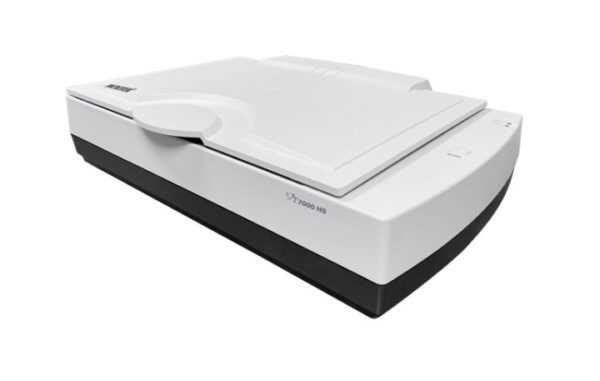
XT7000 HS is a flatbed scanner with high scanning speed which is perfectly designed for using in business categories, data processing and book digitization. Set at 300 dpi, it only takes 2 seconds to scan a material in A3 size and full color.
Equipped with a detecting sensor on the lid, the XT7000 HS can start a scan automatically once the cover is closed; thus, it is more convenient for users to start a scan without pressing any physical buttons. In addition, the top cover is equipped with an assistant hinge, enabling users to lift the cover and stopat an angle position of 30, 70 or 90 degrees.
The design is helpful to release the fatigue value of users for they do not have to repeat the actions of opening or closing the cover when scanning large volumes of originals and therefore enhances the work efficiency extremely.
Bundled with the advanced ScanWizard DI software, it provides users with smart scanning and image-adjusting tools. It supports auto-crop of multiple images, directly scanning to save as a file or to print out and OCR, making file management more easily.
FEATURES
Lowers the Lid to Scan Directly
Equipped with a scanner lid detection sensor, the XT7000 HS can start a scan automatically once the scanner lid is closed and detected by the sensor. You can perform scan jobs easily without pressing any buttons or repeatedly clicking the mouse.
Crops Multiple Images Automatically
With this feature, the scanner is able to crop and extract multiple images in just one scan automatically, saving extra time from document scanning and image cropping.
Scan Full Color of A3 in 2 sec
The XT7000 HS takes only 2 seconds to scan a full page of A3-size document at 300 dpi. The scanning speed remains the same, no matter the color mode is set up as color, grayscale or B&W, generating constant work efficiency.
No Break Platform
The design of no-break platform ensures the scan bed to be absolutely flat; therefore, no marks will be left on the oversized document once the lid is closed. Also, it is easy for you to slide the scanned document out from the scan bed and makes a book easier to lie flat on the scan bed, decreasing happenings of blurry images closed to the inner margin of a book.
Switchable Black / White Background
With the use of the black background for scanning documents, the scanner can perform automatic image cropping to fit the original size of the image and correct the skewed image during scanning. With the use of the white background, the scanner can ensure a clear background for the thin translucent paper and thus enhance OCR accuracy.
Segmented Scanner Lid
The scanner lid is equipped with an assistant hinge, enabling you to lift the lid and stop at an angle position from 30 to 90 degrees. The design is helpful to release the fatigue value of users for they do not have to repeat the actions of opening or closing the lid when scanning large volumes of originals, enhancing the work efficiency and extending service life of the scanner at the same time.
Quick and Smart-touch Button
The scanner comes with a smart-touch button “Scan” which provides you a quick and easy way to launch a scanning function that can be defined through the ScanWizard DI, including scanning to a file, scanning to print, scanning to OCR, or scanning to email. All you need to do is simply to press “Scan” button.
Dust Proof Design
Implemented with a dust proof design to connectors and the top cover, the scanner inside can be protected effectively from tiny dust and sundries and thus is able to maintain a clean environment for image capturing.
Powerful scanning software
Advanced ScanWizard DI offers a host of smart functions and image adjustment controls for scanning. DocWizard is ideal for managing scanned files, it allows you to easily delete, insert, replace, sort, merge, split, and classify files, making file management more efficient.
SPECIFICATION
Product Name: XT7000 HS
Scanner Type: A3 flatbed scanner
Image Sensor Type: CCD
Resolution: 600 dpi
Light Source: LED
Scanning Mode: Color / Grayscale / B&W
Scanning Area:
Maximum: 12″ x 17″ (304.8mm x 431.8mm)
Minimum: 0.5″ x 0.5″ (12.7mm x 12.7mm)
Scanning Speed: 2 sec@300 dpi, A3(color)
Bit Depth: 48-bit (input) /24-bit (output)
Connectivity: USB 3.0
Drivers: TWAIN
Supported File Types: BMP, JPEG, PDF, TIFF, PDF/TIFF-Multiple Pages
OS Support: Windows 7/ 8 /10/11
Dimensions (L x W x H): 24″ x 16.4″ x 5.9″ (610 x 417.5 x 150 mm)
Weight: 23.6 lbs (10.7 kg)
Power Source:
AC 100V to 240V, 50 – 60 Hz (Input)
DC 24V, 2.5 A (Output)
System Requirements PC:
DVD-ROM drive
Color display with 24-bit output capability
1GB RAM or more (2GB is recommended)
Intel Core i3 processor PC or higher with a built-in USB port
Software Included:
Microtek ScanWizard DI
Microtek DocWizard
Adobe Acrobat Reader
Accessories:
Scanner unit
Hi-Speed USB cable(USB 2.0)
Power adaptor
Software CD(s)
User’s manual(s)

Reviews
There are no reviews yet.